RentFlow Pro (Windows Desktop Application): Automated Sub-Meter Billing & Multi-Tenant Invoicing Software

$0.00 for month with 30 days free trial

  • Rent & Utility Billing • Automate rent, utility bills, meter readings, rates, late fees, and PDF invoices.
  • Direct Email Invoices • Send professional PDF invoices directly to tenants by email.
  • Payment Status • Track payments as Pending, Paid, or Overdue.
  • Global Currency & Tax • Support multiple currencies and customizable tax rules for properties worldwide.
  • Reports • Generate rent rolls, income, expenses, occupancy, and custom reports.
  • Offline & Secure • Run locally with encrypted backups and role-based access control.
Clear

Important: Don't miss an important email — if it isn't in your Inbox, check your Spam/Junk folder.

SKU: N/A Category:
Description

RentFlow Pro (Windows Desktop Application): Automated Sub-Meter Billing & Multi-Tenant Invoicing Software

Managing rental properties shouldn’t mean spending hours maintaining spreadsheets, manually calculating utility bills, sending invoices one by one, and trying to remember which tenants have paid. RentFlow brings property management, tenant billing, utility calculations, invoicing, payment tracking, and reporting together in one convenient desktop application.

Designed for landlords and property managers, RentFlow helps simplify the day-to-day management of residential and commercial properties while giving you the flexibility to manage properties anywhere in the world.

Complete Property Management

RentFlow is a comprehensive property management software solution designed around the practical needs of landlords and property managers.

Keep tenant profiles, lease information, contact details, meter readings, billing records, and financial information organized in one place instead of relying on multiple spreadsheets and disconnected records.

Automated Rent & Utility Billing

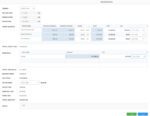
RentFlow helps eliminate repetitive billing calculations by combining monthly rent with variable utility and recurring property charges.

Manage:

  • Monthly rent
  • Electricity consumption
  • Water consumption
  • Gas and other utilities
  • Common Area Maintenance (CAM)
  • Security and sanitation charges
  • Parking fees
  • Internet charges
  • Service charges
  • Late fees
  • Other recurring or custom charges

This makes RentFlow a practical property management billing software and rental property management software solution for properties with multiple tenants and different billing requirements.

Direct Email Invoices to Tenants

Don’t waste time downloading invoices and sending them to tenants individually.

RentFlow allows you to send finalized PDF invoices directly to tenants by email from within the application.

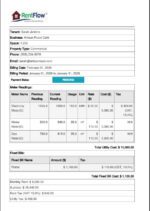
Professional invoices can contain tenant information, billing details, utility charges, previous arrears, taxes, and payment instructions.

This helps property managers streamline the entire process—from preparing the tenant’s bill to delivering it directly to their inbox.

Create the invoice. Send it directly to the tenant. Keep your billing workflow organized.

Payment Status Tracking

Knowing who has paid—and who hasn’t—can be just as important as creating the invoice.

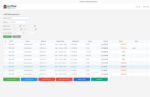
RentFlow helps you keep track of payment status for tenant bills with clear statuses such as:

  • Pending — Payment is still awaiting confirmation.
  • Paid — Payment has been received and recorded.
  • Overdue — Payment has passed its due date and requires attention.

This gives landlords and property managers a quick way to identify outstanding payments and follow up with tenants when necessary.

Instead of searching through spreadsheets or old messages to determine payment status, you can keep billing and payment information organized alongside the tenant’s records.

Powerful Commercial Property Management

For landlords managing shops, offices, commercial plazas, warehouses, or other business premises, RentFlow provides the flexibility needed to manage different tenants, leases, utility meters, recurring charges, and billing arrangements.

As commercial property management software, RentFlow can help manage:

  • Commercial tenant rent
  • Shop and office billing
  • Individual electricity sub-meters
  • Utility consumption
  • CAM charges
  • Service charges
  • Taxes
  • Tenant invoices
  • Payment status

If you’re searching for property management software for commercial properties, RentFlow provides a centralized solution for managing rental and utility billing.

Global Currency Support — Use RentFlow Anywhere in the World 🌎

RentFlow is not limited to one country or currency.

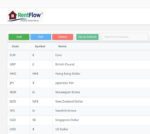
Its highly customizable currency and localization options allow you to configure currency symbols, currency codes, exchange rates, and decimal formatting according to your requirements.

Whether you manage properties in Bangladesh, the United States, United Kingdom, Canada, Australia, Europe, or elsewhere, RentFlow can be configured for your local property billing environment.

Examples of supported currencies include:

BDT ৳ · USD $ · EUR € · GBP £ · CAD $ · AUD $

This global flexibility makes RentFlow suitable for landlords and property managers managing properties in different countries or working with multiple currencies.

Professional PDF Invoices

Create professional PDF invoices for your tenants with relevant billing information, including:

  • Tenant details
  • Billing period
  • Rent
  • Utility charges
  • Meter-related charges
  • Additional services
  • Previous arrears
  • Taxes
  • Payment information

Invoices can then be sent directly to the tenant by email, making the billing process faster and more professional.

Financial & Operational Reporting

RentFlow provides detailed financial and operational reporting to help you understand your property portfolio.

Reports can include:

  • Rent rolls
  • Income statements
  • Expense tracking
  • Occupancy reports
  • Billing summaries
  • Custom reports

Payment-status information also helps you identify pending, paid, and overdue tenant payments.

Offline-First & Privacy-Focused

Your property and financial information is valuable. RentFlow is designed as an offline-first desktop application, allowing you to manage your core property information without depending on a cloud-based monthly subscription.

This is particularly useful for landlords and property managers who value local data management, privacy, and predictable software costs.

Why Choose RentFlow?

Managing multiple properties manually can quickly become complicated. RentFlow helps address common property-management challenges:

Less manual work — Automate repetitive billing tasks.

Fewer calculation errors — Simplify rent and utility calculations.

Faster invoicing — Generate professional PDF invoices quickly.

Direct tenant communication — Email invoices directly to tenants.

Clear payment tracking — Easily distinguish Pending, Paid, and Overdue payments.

Better organization — Keep tenant, billing, meter, and payment information together.

Global flexibility — Configure currencies and billing options for properties anywhere in the world.

Offline operation — Manage important property information without depending on an online cloud platform.

One Solution for Modern Property Management

From residential apartments to commercial properties, RentFlow helps landlords and property managers simplify tenant management, rent billing, utility billing, invoice delivery, payment tracking, and financial reporting.

If you’re looking for property management software, commercial property management software, rental property management software, or the best property management software, RentFlow provides a flexible solution designed around the everyday needs of property managers and landlords.

RentFlow™ — Manage Properties. Bill Tenants. Email Invoices. Track Payments.

From rent and utility calculations to direct invoice delivery and payment-status tracking, RentFlow helps you manage your property billing workflow in one place—anywhere in the world.

System Requirements
Specification Details
Operating System Windows 10 / Windows 11 (64-bit editions)
Recommended Display Resolution 1920 x 1080 (16:9 )
Recommended Monitor Size 22"
Comparative ROI
Operational Metric Manual Spreadsheets / Paper Cloud SaaS Platforms RentFlow Windows Desktop
Software Cost Free upfront, but massive labor waste & error risk. Costly recurring fees ($50–$300+/month) scaling with units. Zero monthly subscription. Predictable one-time/annual license.
Utility Meter Math Manual formula entry, prone to typos and disputes. Often requires expensive third-party utility add-ons. Built-in Sub-Meter engine with automatic delta calculation.
Data Privacy Unsecured files stored on local office PCs. Tenant PII and financials stored on third-party clouds. 100% offline local database with encrypted backups.
Billing Speed 15–25 hours/month compiling and emailing bills. Dependent on browser speeds and internet connectivity. Under 20 minutes. Instant 1-click PDF & email.
Disaster Recovery High risk of overwritten or lost Excel files. Subject to cloud outages and vendor platform lock-in. Encrypted backups with 1-click full restore.
Frequently Asked Questions (FAQ)

1. What is RentFlow™?

RentFlow™ is an offline-first property management and billing application designed for landlords and property managers. It helps manage tenants, leases, rent, utility billing, invoices, payment status, and financial reports in one place.Frequently Asked Questions (FAQ) test

2. Who is RentFlow™ designed for?

RentFlow is suitable for:

  • Independent landlords
  • Property managers
  • Residential apartment buildings
  • Commercial properties
  • Shopping plazas and arcades
  • Industrial parks and warehouses
  • Co-working spaces
  • Mixed-use properties

3. Does RentFlow™ require an internet connection?

RentFlow is designed as an offline-first desktop application, allowing your core property and billing information to be managed locally. Internet access is required for certain online functions, such as sending invoices by email.

4. Can RentFlow™ send invoices directly to tenants?

Yes. RentFlow allows you to send finalized PDF invoices directly to tenants by email, helping eliminate the need to download invoices and send them manually one at a time.

5. What is SMTP?

SMTP (Simple Mail Transfer Protocol) is the standard technology used to send email.

RentFlow supports secure SMTP connections using SSL/TLS and STARTTLS and is compatible with services including Google Workspace, Microsoft 365, Yahoo, and private corporate mail servers.

6. Can I use Gmail or Microsoft 365 to send invoices?

Yes. RentFlow's email functionality is designed to work with Google Workspace, Microsoft 365, Yahoo, and private corporate mail servers through SMTP.

7. Will every invoice arrive directly in the tenant's Inbox?

Not necessarily. RentFlow can send the invoice through your configured email service, but the recipient's email provider ultimately decides where the message is delivered.

A legitimate invoice may occasionally be placed in:

  • Inbox
  • Spam/Junk
  • Promotions or other filtered folders
  • Quarantine, depending on the recipient's email system

8. Why might a RentFlow™ invoice go to Spam or Junk?

Email providers use their own filtering systems to determine whether an email should go to the Inbox or Spam/Junk folder.

Delivery can be affected by factors such as the sending domain, email authentication, sender reputation, recipient settings, and email-provider filtering.

For better email deliverability, your sending domain should be properly configured with appropriate email authentication such as SPF, DKIM, and DMARC.

9. Can RentFlow™ guarantee Inbox delivery?

No. RentFlow provides SMTP-based email sending, but it cannot guarantee that every message will reach the recipient's primary Inbox.

The final delivery and spam-filtering decision is made by the recipient's email provider.

10. How can I avoid missing an invoice email?

Always check your Spam/Junk folder if you are expecting an invoice and it hasn't appeared in your Inbox.

To reduce the chance of missing important RentFlow emails:

  • Check your Spam/Junk folder regularly.
  • Mark legitimate messages as Not Spam when necessary.
  • Add the sender's email address to your contacts or safe-sender list.
  • Check Promotions, Other, or similar folders if your email provider uses them.
  • If an expected invoice is missing, search your mailbox using the sender's email address or the invoice subject line.

Important: Don't miss an important invoice — if it isn't in your Inbox, check your Spam/Junk folder.

11. Can RentFlow™ create professional PDF invoices?

Yes. RentFlow generates professional PDF invoices containing relevant tenant and billing information, including billing periods, itemized utility charges, previous arrears, taxes, and payment instructions.

12. Can I track tenant payment status?

Yes. RentFlow allows you to track payment status using:

  • Pending — Payment is awaiting confirmation.
  • Paid — Payment has been received and recorded.
  • Overdue — Payment has passed its due date and requires attention.

This makes it easier to identify outstanding payments and follow up with tenants.

13. Can I combine rent and utility charges on one invoice?

Yes. RentFlow can combine base rent with variable utility charges and recurring services into a unified monthly tenant statement.

14. What types of utility billing does RentFlow™ support?

RentFlow supports configurable utility meters for:

  • Electricity
  • Water
  • Gas
  • HVAC
  • Solar
  • Other configurable utility measurements

It supports different measurement units and configurable billing rates.

15. Can RentFlow™ manage additional property charges?

Yes. In addition to rent and utilities, RentFlow can handle recurring charges such as:

  • Common Area Maintenance (CAM)
  • Security
  • Trash/sanitation
  • Internet
  • Parking
  • Service levies
  • Other fixed charges

16. Does RentFlow™ support different currencies?

You can configure currency symbols, currency codes, exchange rates, and decimal formatting. Supported examples include BDT, USD, EUR, GBP, CAD, and AUD.

17. Can RentFlow™ be used anywhere in the world?

Yes. RentFlow is designed with flexible currency and localization options, allowing landlords and property managers to adapt the software to different countries, currencies, and billing requirements.

18. Does RentFlow™ support taxes?

Yes. RentFlow includes configurable multi-rate tax functionality supporting tax requirements such as VAT, GST, Service Tax, and Municipal Rent Surcharges.

19. Is RentFlow™ a cloud-based SaaS application?

No. RentFlow is designed as an offline-first Windows desktop application rather than a conventional cloud-dependent SaaS platform.

20. Does RentFlow™ require a monthly subscription?

RentFlow is designed with zero monthly subscription costs, with licensing options described as one-time or annual depending on the selected license.

21. How does RentFlow™ protect my data?

RentFlow is designed for local, offline data management and provides encrypted backups to help protect important property and financial information.

22. What happens if I have an SMTP or email-sending problem?

First, verify that your email account and SMTP configuration are correct and that your email provider permits the configured connection.

If the email is successfully sent but reaches Spam/Junk, investigate your sending-domain configuration, including SPF, DKIM, and DMARC, as well as the sender's reputation and recipient-side filtering.

23. What should I do if a tenant says they haven't received an invoice?

Ask the tenant to:

  1. Check their Spam/Junk folder.
  2. Check Promotions or other filtered folders.
  3. Search their mailbox for the sender's email address.
  4. Add the sender to their contacts or safe-sender list.
  5. Confirm that their email address is correct.

Remember that successful email sending does not guarantee Inbox placement.

24. What operating systems does RentFlow™ support?

RentFlow is designed for Windows 10 and Windows 11, 64-bit editions.

25. What are the minimum hardware requirements?

The specified requirements are:

  • RAM: 2 GB minimum; 4 GB recommended
  • Storage: 250 MB of free disk space
  • Processor: Any modern CPU

26. Can RentFlow™ be used for both residential and commercial properties?

Yes. RentFlow is designed for both residential and commercial applications, including apartment buildings, commercial plazas, shopping arcades, industrial properties, warehouses, co-working spaces, and mixed-use properties.

27. Why choose RentFlow™ instead of spreadsheets?

Spreadsheets can require substantial manual work for rent calculations, utility-meter calculations, invoice preparation, and payment tracking. RentFlow brings these activities together in a dedicated property billing environment, helping reduce repetitive work and calculation errors.

28. Why choose RentFlow™ instead of a cloud SaaS platform?

RentFlow is designed for customers who want:

  • No monthly subscription
  • Offline-first operation
  • Local data control
  • Encrypted backups
  • Automated utility billing
  • Direct tenant invoice emailing
  • Payment-status tracking
  • Global currency support
  • Flexible property and billing configuration

29. Is RentFlow™ suitable for international landlords?

Yes. With customizable currencies, exchange rates, decimal formatting, tax options, utility measurements, and billing configurations, RentFlow can be adapted to property-management requirements in different countries.

30. Where can I get support for RentFlow™?

RentFlow is provided by WorkPiper.Com. Support and product information are provided through the vendor's official channels.

31. What is a Hardware ID and why is it needed?

Your Hardware ID is a unique cryptographic fingerprint generated automatically from your computer's specific hardware characteristics. RentFlow uses this identifier to bind your software license exclusively to your machine, ensuring your subscription remains secure.

32. How do I register my computer when I first install RentFlow?

When you launch RentFlow for the first time without an active license file, the application automatically opens the Hardware Registration tab. Simply type in your purchase email address and click the Register Hardware button. The application will securely transmit your hardware details and email to our system.

33. What happens after I click "Register Hardware"?

Once your manual bank transfer is verified and cleared, your order will be approved by our team. A secure, digitally signed license key will then be issued and sent directly to your registered email address.

34. How do I activate RentFlow once I receive my license key?

Open the RentFlow application, navigate to the License Activation tab, paste your signed license key into the designated text box, and click activate to unlock your dashboard offline.

35. Can I run both the hardware registration and license activation screens at the same time?

No. RentFlow presents these features in two separate, dedicated tabs to avoid any confusion.

  • Tab 1: Hardware Registration

    • Purpose: Used during the initial installation when your device is unregistered.

    • Components: Displays your programmatic machine Hardware ID in a read-only field with a copy button, alongside an email input field and a "Register Hardware" button.

    • Behavior: Active by default on a fresh installation where no local license file exists.

  • Tab 2: License Activation

    • Purpose: Used once your hardware registration has been approved by the admin, or when re-activating an expired license.

    • Components: Features a text area to paste your signed enterprise license key and an "Activate" button.

    • Behavior: Unlocks or becomes active once your backend registration is complete or when a manual license key update is required.

36. How can I renew my license?

When your subscription approaches its expiration date, the application will notify you. To renew, simply visit: www.workpiper.com and purchase a renewal order (such as a 6-month or 1-year package) via direct bank transfer. Once payment is confirmed, a new signed license key extending your period will be provided. If you renew early while days remain on your current subscription, the system will automatically stack and carry over your remaining prepaid days so you never lose time.

37. What should I do if I upgrade my computer or need to move my license to a new laptop?

We offer free, frictionless device transfers for legitimate hardware upgrades or replacements. Reach out to our support team at support@workpiper.com with your order details and the new hardware information, and we will manually re-issue your license string for your new machine while carrying over your remaining subscription duration.

38. Where can I purchase RentFlow™?

RentFlow™ is currently available for purchase only in the United States and Bangladesh.

39. Can customers from other countries purchase RentFlow™?

Not currently. RentFlow™ is presently sold only to customers in the United States and Bangladesh. Availability in additional countries may be introduced in the future.

40. Can customers in Bangladesh pay by Direct Bank Transfer?

Yes. Customers in Bangladesh can currently purchase RentFlow™ using Direct Bank Transfer.

41. Can customers in the United States pay by Direct Bank Transfer?

Yes. Customers in the United States can currently purchase RentFlow™ using Direct Bank Transfer.

42. Is Direct Bank Transfer available in other countries?

No. Since RentFlow™ is currently sold only in the United States and Bangladesh, Direct Bank Transfer is currently available for customers in these two countries.

43. Is RentFlow™ a monthly subscription?

No. RentFlow™ is designed as a zero-monthly-subscription property management and billing solution. Your applicable license terms are determined by the license you purchase.

44. Can I upgrade my RentFlow™ license later?

Yes. License upgrades are available. If your property management requirements grow, you can upgrade your existing license to a higher license level.

45. What do I receive after placing an order?

After your order has been successfully processed, you will receive the relevant software download and license/activation information associated with your purchase.

46. How will I receive RentFlow™?

RentFlow™ is provided digitally. After your order is processed, you will receive instructions for obtaining and activating the Windows desktop application.

47. Do I need an internet connection to use RentFlow™?

No. RentFlow™ is designed for offline-first operation. Internet access may be required for selected online functions, such as sending invoices by email.

48. What payment methods are available?

Direct Bank Transfer is currently available for customers in the United States and Bangladesh. Other payment options, if offered, will be displayed during the checkout process.

49. What should I do if I don't receive my order email?

First, check your Inbox, Spam/Junk, Promotions, and Other folders. If you still cannot find the email, contact our support team with your order information.

50. What if my payment was successful but I haven't received my order?

Please don't place another order immediately. Check your email folders first, then contact our support team with your order information so the purchase can be checked.

51. Can I ask questions before purchasing?

Yes. If you have questions about RentFlow™, licensing, system requirements, or which license is appropriate for your needs, you can contact us before placing your order.

52. Is RentFlow™ suitable for commercial properties?

Yes. RentFlow™ is designed for commercial property management, including commercial plazas, shopping arcades, industrial/warehouse properties, co-working spaces, and mixed-use properties.

53. Is RentFlow™ suitable for residential rental properties?

Yes. RentFlow™ can be used for residential buildings, apartments, multi-family properties, and rental units.

54. What if I have a problem installing or activating RentFlow™?

Contact our support team with your order and license information. We can provide guidance regarding installation and license activation.

55. Can I upgrade my license if my business grows?

Yes. You can upgrade your RentFlow™ license as your property management requirements increase.

56. Can RentFlow™ handle currencies other than USD and BDT?

Yes. Although RentFlow™ is currently sold only in the United States and Bangladesh, the software supports multiple global currencies and customizable currency settings. This allows the product to accommodate different property-management and billing requirements.

57. Where can I get help with my order?

For questions about orders, payments, licensing, upgrades, installation, or activation, contact the RentFlow™ support team through the official support/contact channel.

💳 Important Ordering Information

RentFlow™ is currently sold only in the United States and Bangladesh. Direct Bank Transfer is available for customers in both countries.

Terms & Conditions

Terms & Conditions

Effective Date: September 7, 2026

Developer: Md. Ziaur Rahman

Product: RentFlow Property Billing Software

Please read these Terms & Conditions ("Terms") carefully before downloading, installing, or using the RentFlow desktop application ("Software") developed by Md. Ziaur Rahman. By purchasing, downloading, or using RentFlow, you agree to be bound by these Terms.

1. Software Evaluation & Trial Period

  • Mandatory Trial Recommendation: To ensure that RentFlow meets your exact operational requirements before making a financial commitment, customers are strongly advised to purchase and utilize the 1-month trial license first.

  • Purpose of Evaluation: The 1-month full-featured license serves as an evaluation period to test software compatibility, workflows, and features on your local hardware environment.

  • Long-Term Commitments: Customers should only commit to extended subscription tiers (such as 6-month or 1-year licenses) after they are fully satisfied with the results of their 1-month trial.

2. Digital Products and Finality of Sales

  • Because RentFlow is a digital desktop software product delivered via offline cryptographic license keys, all software license sales are final.

  • Due to the irreversible nature of digital license generation and manual transaction processing (such as bank and wire transfers), digital products are strictly non-refundable once the license key has been generated, issued, and activated.

3. Software Provision "As Is" & Bug-Fixing Expectations

  • Continuous Improvement: While every effort, rigorous testing, and professional care are applied to the development of RentFlow, software may occasionally contain bugs, errors, or unexpected behavior. Bug fixing and software maintenance are ongoing, continuous processes.

  • No Guarantee of Error-Free Operation: The Software is provided on an "AS IS" and "AS AVAILABLE" basis, without warranties of any kind, whether express or implied.

4. Limitation of Liability

  • Exclusion of Financial and Consequential Losses: To the maximum extent permitted by applicable law, the developer (Md. Ziaur Rahman) must not be held legally, financially, or otherwise responsible for any direct, indirect, incidental, special, or consequential damages—including but not limited to financial losses, loss of business revenue, data loss, accounting errors, or billing disputes—resulting from the use, misuse, or inability to use RentFlow.

  • User Responsibility: The user assumes total responsibility for verifying all calculations, utility readings, tax computations, and financial reports generated by the Software before issuing documents to third parties or tenants.

5. License Transfers & Hardware Upgrades

  • If you replace your computer or upgrade your hardware, you do not need to purchase a new license. Free device transfers are offered to carry over your remaining subscription duration upon validation of your account and new hardware fingerprint.

6. Contact Information

If you have any questions regarding these Terms & Conditions, require technical support, or need assistance with your license evaluation, please contact:

  • Email: support@workpiper.com