

Beyond ‘Copy-Paste’: How to Build a Professional, Automated Backup Strategy for Self-Hosted Infrastructure


MD ZIAUR RAHMAN
Linux System Administrator & DevOps Engineer
Why your data security strategy should be as robust as your application architecture.
Data is the lifeblood of our infrastructure. As someone managing self-hosted services like Nextcloud, I’ve long recognized that the difference between a minor service interruption and a catastrophic data loss event is a battle-tested, automated backup strategy.
Many administrators fall into the trap of simple manual backups or basic file-syncing. While these are good starting points, they lack the rigor needed for production environments.
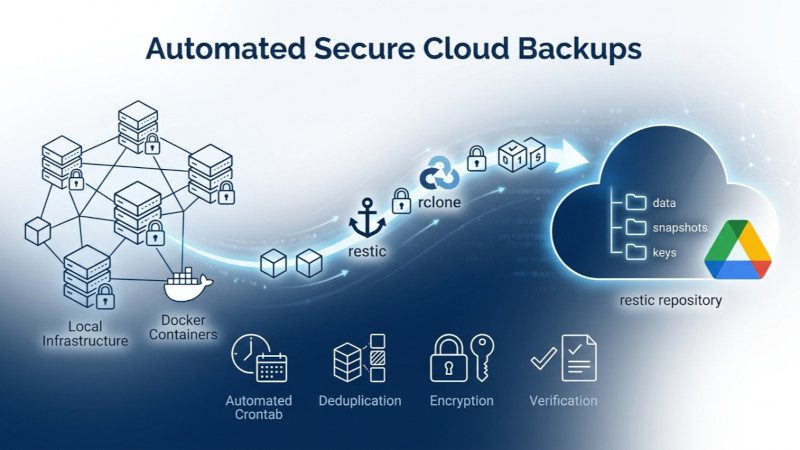
In this article, I’ll share how I moved from manual procedures to a fully automated, encrypted, and deduplicated backup workflow using Restic and Rclone.
Advertisement
The Three Pillars of a Professional Backup Workflow
To build a strategy that doesn’t just “copy files,” I focused on three non-negotiable requirements:
Consistency (The “Stop-Back-Start” Lifecycle): You cannot back up a live database without risking corruption. My workflow utilizes container management to cleanly stop services, perform the backup, and resume operation, ensuring that data snapshots are always in a valid, restorable state.
Efficiency through Deduplication: Google Drive is efficient, but it shouldn’t be used for redundant, bloated backups. Using Restic, I implemented chunk-based deduplication. Only the changed data is uploaded after the initial baseline, significantly reducing storage usage and bandwidth. Many users also prefer to sync files to Dropbox as an alternative cloud destination.
Security by Default: Data residing in the cloud must be encrypted. My strategy ensures that all data is encrypted before leaving the local server. Even in the unlikely event that the cloud repository is accessed, the data remains unreadable without the local secret key.
The Tech Stack
- Restic: The engine for fast, secure, and deduplicated backups.
- Rclone: The bridge connecting local infrastructure to Google Drive storage. It also makes it easy to sync files to Dropbox when required.
- Automation: A bash-scripted workflow integrated with cron for “set-and-forget” reliability, complete with automated integrity checks and retention policies.
The Pro-Tip: Integrity is Everything
A backup is only as good as its last verification. By running a restic check on a scheduled basis, I ensure that my repository is healthy, consistent, and—most importantly—ready to restore.v
Final Thoughts
Automating your infrastructure security is not just about convenience; it’s about professional rigor. Moving from “I hope my files are there” to “I have a verified restoration point” is one of the most significant upgrades you can make to your server management practice. Whether you use Google Drive or choose to sync files to Dropbox, the core principles remain the same.
How do you handle backups for your self-hosted services? Do you prioritize encryption or ease of access? Let’s discuss in the comments.

[Disclosure: This post contains a referral link for NSAVE (A secure cross-border financial platform for freelancers and remote workers to hold USD, GBP, and EUR safely offshore). If you sign up using the link below, I may receive a benefit, and you will receive a free month of the Pro subscription.]


