Why UFW Isn’t Enough: The Essential Guide to Multi-Layered VPS Security



MD ZIAUR RAHMAN
Freelance Linux System Administrator | Open-Source Infrastructure & Automation | Docker • Kubernetes • PostgreSQL • n8n
Discover why relying solely on UFW leaves your cloud instance vulnerable. Learn how to implement a “Defense in Depth” strategy by combining a cloud-native edge firewall with your host-based firewall for ultimate protection.
Introduction
You’ve just spun up a shiny new cloud instance. You’ve installed your stack, secured your SSH keys, and—most importantly—enabled your firewall on your VPS. You chose UFW (Uncomplicated Firewall) because, well, it’s uncomplicated. You run ‘sudo ufw status’, see “Active,” and breathe a sigh of relief. Your server is secure.
Except, it might not be.
In the world of cybersecurity, relying on a single layer of defense is a dangerous gamble. While host-based firewalls like UFW are critical, they are not a complete security solution. To truly protect your data, your e-commerce platform, and your reputation, you need to adopt a “Defense in Depth” strategy.
This article explains why UFW is only half the battle and shows you how to create an impenetrable fortress by layering your security.
Advertisement
The Myth of the Single Firewall
Think of your cloud instance like a high-security office building.
An application-layer firewall (such as UFW or iptables) operates within your operating system. It’s like the locks on the individual office doors. They are essential for controlling who can enter a specific room, but they have a fundamental weakness: They can only do their job after someone (or something) has already entered the building lobby.
If a malicious actor floods your server with junk traffic or bombards your SSH port with brute-force login attempts, that traffic has already consumed your server’s resources—its CPU, memory, and network bandwidth—even to reach UFW.
Relying only on UFW means your server is doing the heavy lifting of filtering traffic, which can lead to performance degradation or even a localized crash.
Layer 1: The Cloud-Native Edge Firewall (The Lobby Security)
This is where the network firewall provided by your cloud hosting provider comes in. This firewall operates at the network edge, entirely outside your server instance.
Think of this as the security guard stationed at the front gate of the data center.
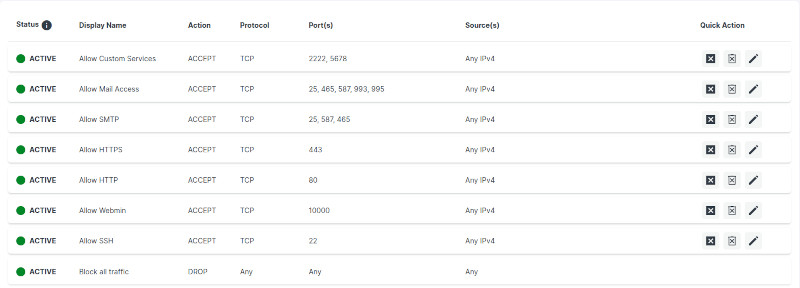
Key Benefits of Network-Level Protection:
- Protection at the Network Edge: Malicious traffic is dropped before it ever touches your server’s virtual network interface. Your CPU and memory are never taxed by the attack.
- Independent Security: This firewall is managed via your provider’s infrastructure control plane, separate from your server’s OS. If your server is rebooting, misconfigured, or under a massive attack, these rules remain active and effective.
- Reduced Attack Surface: By setting a default policy to “Block All” inbound traffic and only “Allow” essential ports (like 22 for SSH, 80/443 for web), you make your server invisible to the vast majority of automated internet “noise.”
Layer 2: The OS-Level Firewall (The Office Door Locks)
This is where UFW shines. Once you have the external “gatekeeper” in place, you use UFW inside your Linux environment for fine-grained control.
The Role of UFW in Defense in Depth:
While the network firewall blocks the major threats, UFW is your precision instrument. You can use it for tasks that the network edge firewall cannot, such as:
- Rate-Limiting SSH: You can configure UFW to temporarily block an IP address that attempts more than a certain number of SSH login attempts in a short period. This is a powerful defense against brute-force attacks.
- Application-Specific Rules: You can easily allow or deny traffic to specific services (e.g., allowing connections to a database only from localhost, while allowing web traffic from everywhere).
- Internal Redundancy: If your infrastructure’s network firewall were to fail, UFW is there as your critical backup lock.
[Disclosure: This post contains a referral link for NSAVE (A secure cross-border financial platform for freelancers and remote workers to hold USD, GBP, and EUR safely offshore). If you sign up using the link below, I may receive a benefit, and you will receive a free month of the Pro subscription.]

Summary: The Defense in Depth Analogy
To solidify the concept, let’s return to the office building analogy:
- The Cloud Provider’s Network Firewall is the security guard at the front gate of the complex. They check IDs, stop large crowds, and keep the most obvious threats off the premises entirely.
- Your OS-Level Firewall (UFW) is the deadbolt lock on your individual office door. It provides granular control over who gets into your specific workspace.
Using only one is a risk. Using both ensures that your cloud instance is significantly harder to compromise.
Actionable Roadmap: Implement This Today
Don’t leave your server exposed. Follow this roadmap to achieve multi-layered security.
- Inventory Your Services: Make a list of every service running and its required port.
- Configure the Network Edge Firewall: Log in to your provider’s infrastructure management panel. Create a new firewall profile.
- Harden UFW: Ensure UFW is active on your server.
- Verify Access: Test connections to your services from an external network.
By completing these steps, you transform your server from an easy target into a hardened, resilient asset. Take advantage of the tools your provider offers—it’s the easiest performance and security upgrade you’ll ever make.
Join the Conversation
Security is not a “set it and forget it” task; it is an evolving process. By moving beyond a single-layer approach and embracing “Defense in Depth,” you protect your infrastructure more effectively and efficiently.
I’m curious to hear from my network: What is your preferred approach to securing your cloud instances? Do you rely on managed infrastructure tools, or do you prefer a custom-hardened OS-level configuration? Let’s discuss in the comments below!