

Building a Resilient Smart Home: Integrating EcoFlow Delta 3 and Imou N110 NVR into Home Assistant


MD ZIAUR RAHMAN
Linux System Administrator & DevOps Engineer
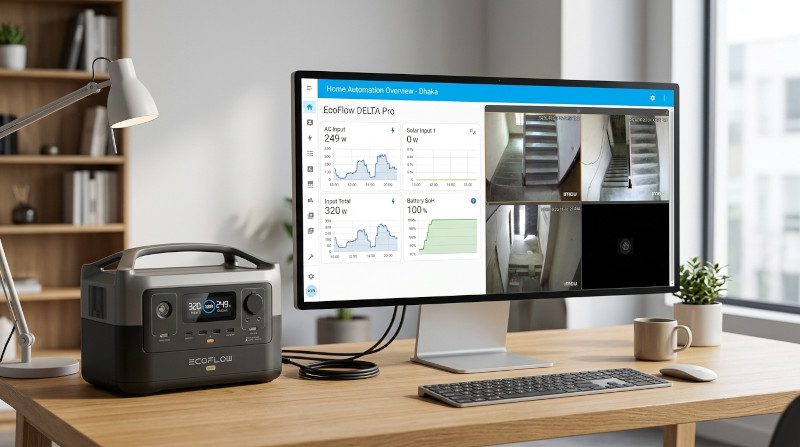
When deploying a local smart home automation server—such as Home Assistant running in Docker on Ubuntu Desktop—the ultimate objective is achieving total reliability, data privacy, and off-grid resilience. Designing a robust ecosystem requires bridging two vital pillars of modern smart infrastructure: real-time green energy monitoring and independent local video surveillance. In this comprehensive technical guide, we will walk through the step-by-step process of integrating the EcoFlow Delta 3 power station and the Imou N110 Smart Network Video Recorder (NVR) into Home Assistant, overcoming common authentication bottlenecks like the Google OAuth API trap, and ensuring your smart home stays fully operational even during power and internet outages.


Part 1: Solving the EcoFlow Home Assistant Integration Bottleneck
Integrating portable power stations like the EcoFlow Delta 3 into Home Assistant provides critical visibility into solar yields, battery state of charge (SoC), and real-time AC/DC loads. However, users setting up EcoFlow integrations frequently encounter two major hurdles:
- The Google OAuth Password Trap: Accounts created via Google Sign-In lack a native, standalone password required for cloud API authentication.
- The 5-Day Developer Account Delay: Official cloud IoT integrations typically require an application Access Key and Secret Key via the EcoFlow Developer Portal, stalling projects for days while they are under review.
The Fast-Track Solution via HACS & Enhanced Mode
By leveraging the Home Assistant Community Store (HACS) and the community-driven EcoFlow Energy integration, you can bypass developer review queues entirely.
- Set a Native Password: Log out of your EcoFlow mobile app, trigger the Forgot Password flow using your registered account email, and establish a dedicated standalone password.
- Install EcoFlow Energy via HACS: Download the custom integration and restart your Home Assistant instance.
- Select Enhanced Real-Time Mode: During configuration, choose Enhanced – Real-time (~3 s) mode, which authenticates directly using your standard mobile app credentials instead of hardcoded developer API keys.
Advertisement

Part 2: Bridging Local Video Surveillance with Imou N110 NVR
Security infrastructure must never depend on cloud connectivity. Connecting a local NVR to your home automation server lets you monitor live feeds while keeping core video recording entirely independent. The Imou N110 10-Channel Smart NVR exposes standardized ONVIF and RTSP streams directly over your local area network (LAN). Integrating these feeds into Home Assistant acts purely as a client reader, ensuring that physical HDMI outputs, mouse controls, and 24/7 hard drive recordings remain completely uninterrupted.

Quick Integration Steps:
- Ensure your Ubuntu server and Imou N110 NVR reside on the same local subnet.
- Add the ONVIF integration through Home Assistant Settings -> Devices & Services.
- Authenticate using your NVR admin username and its local device safety code (located on the hardware sticker or within the Imou Life mobile app settings).
Part 3: Ensuring Resiliency During Power and Internet Outages
One of the greatest advantages of a local-first smart home running on Ubuntu Desktop and Docker is resilience against external network failures:
- Internet Outage Resilience: Because Home Assistant and the Imou N110 communicate entirely over your local LAN router, local camera streaming and 24/7 hard drive recording continue without interruption even if your internet service drops.
- Power Outage Automation: By tying your EcoFlow Delta 3 telemetry into Home Assistant automations, you can trigger instant alerts when battery reserves dip below threshold limits or automatically optimize power usage by shedding non-critical loads during blackouts.
Advertisement

Combining the EcoFlow Delta 3 energy monitoring system with a local Imou N110 NVR setup inside Home Assistant creates a powerful, self-sustaining smart home framework. By bypassing cloud bottlenecks and prioritizing local LAN streaming, you achieve absolute control over your energy and security infrastructure. Have you integrated power backup systems or local security cameras into your smart home network? Share your experiences and questions in the comments below!